The Arduino UNO Q, explained in five levels
The board you already know has a Linux computer in it now. Explained five times: to a child, a teen, a college student, a grad student, an expert.
You probably have one of these in a cupboard. It is blue. It is about the size of a playing card. It has two rows of black sockets.
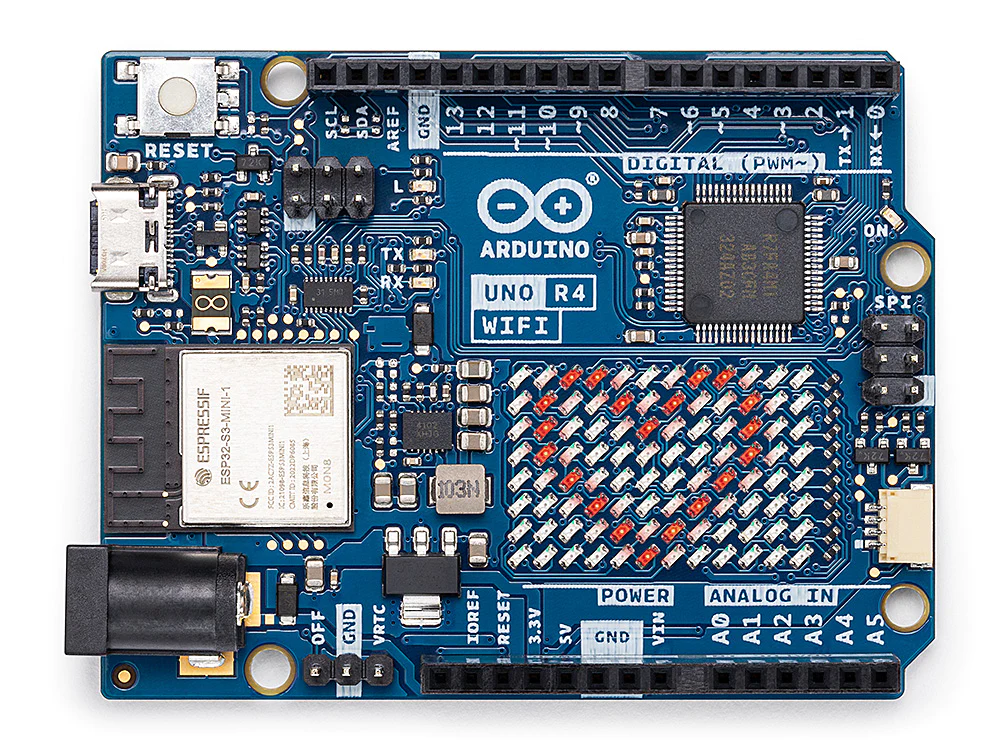

In October 2025 Arduino made a new one. Same shape. Two brains inside instead of one. They called it the UNO Q.
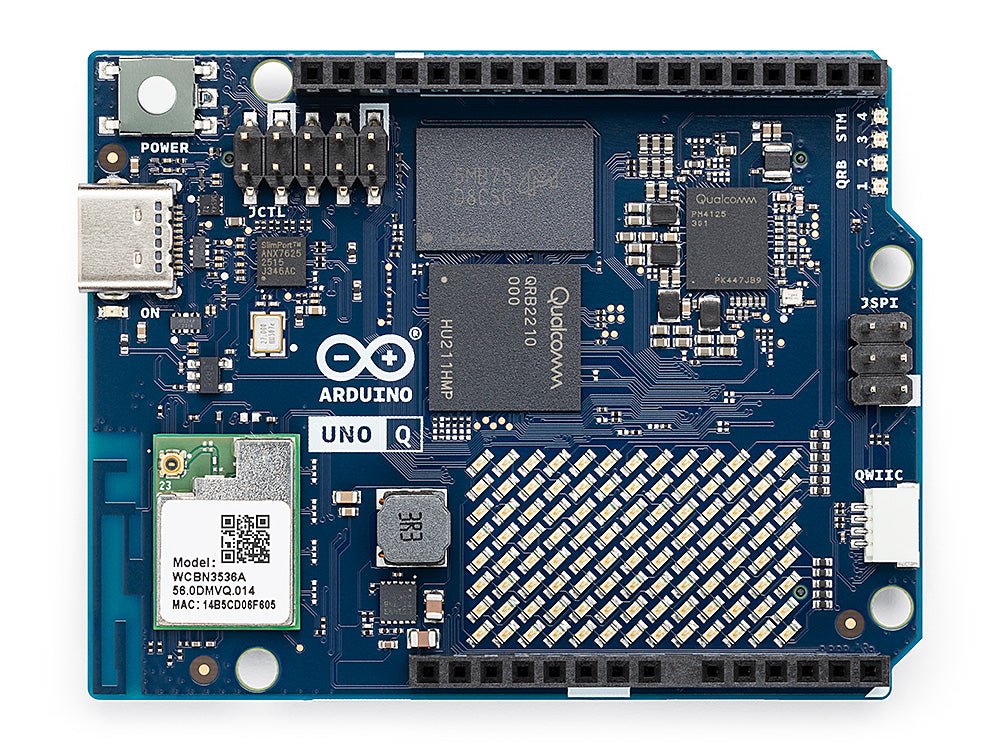
Here is the short answer, before we take it apart.
An Arduino is good at one small job. It does that job exactly on time, every time, for years.
A computer can do almost anything. But it is bad at being exactly on time.
The UNO Q has one of each. On one board. Already wired together.
That is the whole thing. The rest of this page says it five times, and says a little more each time.
We borrowed this from WIRED’s Five Levels. One expert explains one idea to five people. A child. A teen. A college student. A grad student. And last, another expert.
The clever part is how she starts. She never starts with the big word. She starts with something the other person already knows. A photo of a dog. A song they like. Their own inbox. The big word comes last. It only gives a name to something they have already worked out.
So every level below tells you where it starts.
Child
starts from a clock on the wall
Look at a clock on a wall.
It has done one job for years. It never gets confused. It has never needed turning off and on again.
Now look at a phone.
A phone can do almost anything. It can even tell you the time. It can also freeze while you are holding it.
An Arduino is the clock. A computer is the phone.
Now say you are building a robot.
Your robot has to watch a sensor and never miss anything. That is a clock’s kind of job.
It also has to look through a camera and work out if that is a wall or a person. That is a phone’s kind of job.
So which one do you put in?
Both. And that used to mean two boards and a wire between them. Getting the two to talk took most of the afternoon. The robot got whatever was left.
The UNO Q is one board with a clock and a phone on it. They sit next to each other. They are already talking.
Teen
starts from a game that freezes for a second
You have had a game freeze for a second.
It does not crash. It just stops. About a quarter of a second, usually at the worst possible moment.
That is the operating system. For a moment it decided something else mattered more than your game.
In a game that is annoying. Now put the same pause in the code that holds a motor steady. Now it is not annoying. It is a robot in a wall.
So there are two kinds of chip. The difference is not size.
A microcontroller runs your program and nothing else. There is no operating system underneath it. Nothing can take the chip away from you. Tell it to wait two milliseconds and you get two milliseconds.
That has a name. Real time. It is the whole reason an Arduino is built the way it is.
A microprocessor runs an operating system. An operating system is the program in charge. It decides what runs and when. It can decide your program waits while it saves a file.
You lose the promise about time. You get files, Wi-Fi that works properly, Python, gigabytes of memory, and every program anyone ever wrote for Linux.
Neither one is better.
Before the UNO Q, a project that needed both meant two boards and a wire. Plus a little code you wrote yourself so the two could talk. Ask anyone who has done it. The project stops being about the robot and starts being about the wire.
The UNO Q puts both chips on one board. The wire is somebody else’s problem now.
College Student
starts from a line of code you have trusted
You have written this line and trusted it:
delay(1000);Now write what looks like the same line on Linux:
sleep(1);Then read the manual. It says at least one second.
Not one second. At least one second.
That difference is what this whole board is about.
On the UNO Q both lines are true at once. There are two different machines inside, one for each line.
The real-time side is an STM32U585, a Cortex-M33. It runs your Arduino sketches on Zephyr.
The Linux side is a Qualcomm Dragonwing QRB2210. It runs full Debian. Four 64-bit Arm Cortex-A53 cores at 2.0 GHz, with 16 GB of eMMC storage on the base board.
That is not a toy. It is roughly a mid-range phone from a few years ago, with your sketch running beside it.
Two words there matter more than the clock speed.
Debian. Not a cut-down embedded build. Not a vendor fork you cannot update. Debian means apt. A Python package installs the way its docs say it installs. Ask “can I run this on it” and the answer is usually just yes.
Zephyr. Until now your sketch had the chip to itself. That is what people mean by bare metal. Not here. Here it runs on a real-time operating system. You get threads, timers and drivers you would have had to write. You can no longer assume that loop() is the only thing on that chip.
That is a good trade. It is still a trade. Worth knowing you made it.
Grad Student
starts from the road between the two halves
By now the interesting question is not what is on the board. It is what the road between the two halves costs you.
Two processors on one board is not new. It has never been the hard part.
The hard part is the road, and the rules for using it. How does a sketch hand a picture over to Linux? How does Linux hand a decision back? Who owns a pin, and when? And what is the timing promise worth when the Linux side is busy?
Something follows from that. It is much better to see it before you build than after.
Anything that crosses the road has left real time.
So the board pushes you towards one way of building. The microcontroller becomes the part that senses and moves on time. The microprocessor becomes the part that thinks. They are not two partners sharing the work. One is a fast reflex. The other is a slow thought.
And every reflex that has to wait for a thought stops being a reflex.
That is a fine design. It is also a limit.
The other thing worth a look is Zephyr. It is the quiet story on this board.
For twenty years an Arduino sketch has meant one thing. Your code, the hardware, nothing in between. On an RTOS it means something else.
Most of the time you will not notice. The interesting question is when you do.
Expert
starts from years of arguing about boards
Put two people who build with these boards in a room. They will not spend long on the chips. The chips are not the argument. They will argue about whether anyone needed them.
Here is the case for it. School and college labs have a gap in them. On one side, blink an LED. On the other, recognise something with a camera. Crossing it used to cost two boards, two toolchains, and a teacher explaining serial protocols to fourteen year olds who only wanted a robot. On one board that crossing is a chat between two chips. Plenty of good ideas have died on that wire.
Here is the case against, and it is not weak. It costs more than an R4. It uses more power. There is more of it to go wrong. A Linux system that will not boot is a worse afternoon for a teacher than a sketch that will not compile.
A class learning digitalWrite does not need Linux. Handing them Linux will not teach them digitalWrite any faster.
And most school projects are not short of computing power. They are short of time. And short of anyone having taught the teacher.
So the question is not which board is better. That is the one everybody asks first. The real question is whether your students have hit the ceiling of the board you already own.
The ceiling test
Has anyone in your lab wanted a camera, an AI model, or a real network connection, and been told not with this board?
- No
- Not your upgrade yet. The R4 on your shelf is still one of the best teaching objects anyone has made.
- Yes
- Then it is. Buy one, not thirty, and let the students who asked show you what it can do.
We should say this plainly. We make a teaching editor for Arduino hardware. So we are not neutral about what a school should buy. We would tell you the same thing about ours.
The short version
The board you know has a computer in it now.
Whether that is exciting or boring depends on one thing. It is not the board. It is whether anyone in your class has run out of space to build.
Keep reading
Three more from the notebook.
4 September 2026
Think Inside the Box
The least useful advice you can give a teacher with thirty children, one room and forty minutes. The argument for working inside the limits instead.Read it 5 June 2026
Git & GitHub for Beginners: From Zero to First Commit
A hands-on Git and GitHub tutorial for complete beginners. Install it, make your first commit, push to GitHub, and learn branches, in one sitting.Read it5 June 2026
What Is Git? 7 Ways It Quietly Saves Your Work
Git is the quiet safety net under almost all modern software. Here is what it actually is, in plain English, and seven everyday ways it saves your work.Read it
Beyond the notebook
This is what we do in schools.
A year-long programme for classes 6 to 12. Creativity, taught as a skill, inside the classroom you already have, led by your teachers.